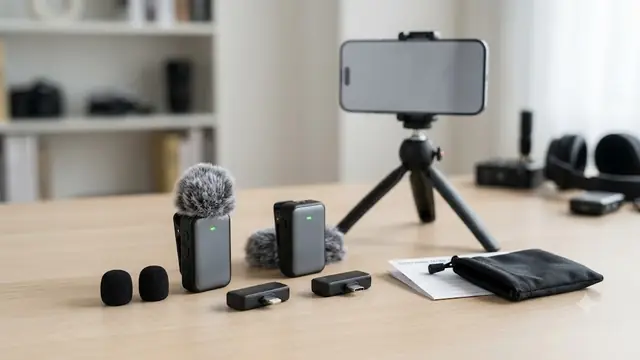
Phone has USB-C
Use a receiver designed for USB-C audio input
- Confirm the receiver plug seats fully with the case installed.
- Connect the receiver before opening the recording app.
- Record both voices and replay the file.
Two-person iPhone audio guide
Start with the phone port and the receiver, not the word "dual." iPhone 15 and later use USB-C; iPhone 14 and earlier use Lightning. A suitable kit needs two working transmitters plus a documented receiver path for the phone in front of you. One USB-C receiver with a Lightning adapter is different from a kit with two dedicated receivers, and neither design proves that the app will record separate editable tracks.
Choose the receiver pathRecord and replay both voices before the real take.
01 / Phone connector
Apple moved the iPhone to USB-C with the iPhone 15 family. The iPhone 14 family and earlier models use Lightning. That gives you the first branch in the decision, but not the final answer. A plug can have the right physical shape and still fail if the receiver, adapter, case, or recording app does not support the complete audio path. Apple notes that compliant USB-C microphones can connect to supported iPhones and also warns that noncompliant accessories may not work as expected.
Phone has USB-C
Phone has Lightning
Case clearance is a practical failure point. A thick case can prevent a compact receiver from reaching the phone port even when the connector is correct. Remove the case for the first test. If that fixes the problem, use a case with adequate port clearance or a short extension only when the product maker documents that arrangement. A loose, half-seated receiver can look connected while the phone continues to use its internal microphone.
A mixed-device team has a second decision. Suppose the interviewer owns an iPhone 15 and a colleague sometimes supplies an iPhone 13. A kit with separate USB-C and Lightning receivers makes the physical choice obvious, though it adds another small part to charge and pack. A kit with one USB-C receiver plus a Lightning adapter reduces the receiver count but makes the adapter essential. Neither architecture is universally better. The dependable one is the path the team can identify, keep together, and verify before every recording.
For a broader look at how USB-C behaves with other audio products, the guide to USB-C audio accessories on iPhone 15 explains why connector shape, digital audio support, and accessory recognition are separate checks.
02 / Terminology
The word is overloaded. A listing can call a system dual because it includes two transmitters, because the receiver accepts two input channels, because the box supports two phone connector types, or because the recording can preserve two isolated tracks. Those capabilities often appear together in higher-end systems, but one does not guarantee the others.
This is the minimum format for a two-person interview. It says nothing about how the receiver sends those voices to the phone.
The phone may still receive one mixed signal. Check the output and app behavior before expecting separate editing.
This may mean two dedicated receivers or one receiver plus an adapter. The packing and failure points differ.
This requires explicit product and app support, or onboard recordings. Two microphone clips alone do not prove it.
Consider a simple street interview. If the goal is a finished social clip with both voices at similar levels, a receiver that mixes two transmitters into one phone input may be enough. Place the mics consistently, run a level check, and record. Now consider a long interview where one guest speaks softly and the other laughs loudly. A mixed file leaves less room to fix the difference later. Separate tracks, individual gain control, monitoring, or onboard backup become more valuable because the production needs more recovery options.
The distinction also changes troubleshooting. If only one speaker is missing, the cause could be a transmitter that never paired, a depleted battery, a muted channel, or an app that recorded an unexpected channel layout. If both speakers are missing, the problem is more likely in the receiver-to-phone path or app input selection. Naming each part correctly turns a vague "wireless mic problem" into a short sequence of checks.
03 / Receiver architecture
The receiver is the bridge between the microphones and the recording device. The transmitters use their own wireless link to reach the receiver. The receiver then presents audio to the iPhone through USB-C or Lightning. This is why many plug-in kits do not need normal Bluetooth pairing in the phone settings. The phone sees the physical receiver, while the microphones pair with that receiver.
| Architecture | Practical advantage | Main failure point | Good match |
|---|---|---|---|
| USB-C receiver plus Lightning adapter | One main receiver covers two phone generations with fewer large pieces. | The small adapter can be lost, loosely seated, or unsupported by a case/app combination. | Budget teams that can keep the adapter with the kit and test before each take. |
| Dedicated USB-C and Lightning receivers | The correct plug is obvious and no conversion step sits between receiver and phone. | There are more pieces to label, charge where required, and pack. | Mixed-device teams that switch phones often. |
| Multi-cable receiver set | Can extend the kit to phones and some 3.5 mm devices. | Cable choice, TRS/TRRS differences, and extra loose parts add setup burden. | Teams that genuinely use several device types and can document each route. |
| Higher-end receiver with monitoring or backup | Provides more ways to catch or recover a failed take. | Higher cost, more controls, and a more deliberate production process. | Long interviews or paid work where retakes are expensive. |
An adapter path is not automatically fragile, but it creates another connection that must be fully seated and retained. Tape or permanent strain on a phone port is not the answer. Instead, keep the adapter in a labeled pouch or attached accessory slot, remove a case that blocks insertion, and verify the path with a real recording. Indicator lights can show that the transmitters and receiver see one another while saying nothing about whether the app captured that receiver.
Dedicated receivers reduce ambiguity at the phone, though they do not solve every issue. A USB-C receiver may work on one supported iPhone and behave differently in another app or with a noncompliant extension. A Lightning receiver may become irrelevant when the team upgrades devices. The best architecture for a mixed team is the one that makes the next shoot easier to verify, not the one with the longest connector list.
04 / Reliability needs
A simple two-transmitter kit can be enough when the connector path is clear and the result is replayed before the scene changes.
Receiver controls, clear indicators, a charging case, and a disciplined pre-take test become more useful.
Monitoring, isolated channels, onboard backup, established support, and a second recording path deserve priority over a low-friction plug-in kit.
This ladder is more honest than labeling a microphone "professional" from its listing title. A low-cost kit can be perfectly useful for a short, repeatable recording. It becomes a poor fit when the production requires recovery features it does not document. Decide how expensive a missed voice would be, then choose the safeguards accordingly.
05 / Pre-take check
A test should prove more than a green light. It needs to cover both transmitters, the receiver, the physical connector, the recording app, the speaker balance, and the saved file. Do it with the same phone, case, adapter, app, camera orientation, and microphone placement planned for the real take.
A useful worked example is an iPhone 15 interviewer recording a guest. Connect the USB-C receiver, clip one transmitter on each person, and record Speaker A near the phone followed by Speaker B farther away. If the playback sounds almost the same whether a transmitter is covered or uncovered, the app may be using the phone microphone. If only one voice is present, recheck the second transmitter's pairing and mute state before changing app settings at random.
Repeat the test whenever the phone, app, receiver, adapter, or major setup changes. A successful recording yesterday does not prove that a different iPhone, thick case, camera app, or replacement adapter will behave the same way.
06 / Placement and noise
RODE's lavalier guidance places the microphone around 20 to 30 centimeters from the mouth as a practical starting point. For most adults, that means the upper chest rather than the waist or jacket pocket. Keep the capsule clear of fabric edges, necklaces, hair, and loose folds that can brush it while the speaker moves. The transmitter body also needs a stable clip position so its weight does not pull the microphone toward a collar or scarf.
Two-person recording makes consistency important. Put both microphones at roughly comparable distances from their speakers, then use the test recording to account for different voice levels. A soft-spoken guest may need slightly closer placement, while a loud speaker may need more distance or lower gain if the receiver supports it. If the phone receives one mixed track, getting the balance right before recording matters much more because the speakers cannot be separated cleanly later.
Use the bare or foam-covered capsule as the product allows, keep it off rubbing fabric, and listen for room echo. Electronic noise modes cannot remove a collar striking the microphone.
Fit the furry windscreen securely, place the microphone behind a small clothing edge when that does not cause rubbing, and turn the speakers so strong wind does not hit the capsule directly.
Match distance first, then use receiver or app controls only when their behavior is understood. Record a natural laugh or louder phrase during the test, not just quiet counting.
Check the clip under the movement expected in the scene. A microphone that stays quiet while standing may rub when the person turns or reaches.
Noise reduction is a mode to evaluate, not a substitute for placement. Strong processing can reduce steady background sound while also changing the voice or failing against wind and fabric contact. This page does not claim a controlled noise-reduction result for the Labstandard K9 or the alternatives. Use the physical setup first, then compare a short processed and unprocessed recording if the kit offers that choice.
07 / Product routes
These products are not ranked by sound quality. The available evidence is stronger for connector layout and included pieces than it is for real app behavior, range, latency, battery, or noise processing. Compare the receiver route, the number of loose parts, the safeguards the work needs, and the evidence boundary on each card. Then run the same two-voice test on the chosen phone.
This page may earn a commission from eligible purchases made through the Amazon links below. The price you pay is unchanged.

Primary adapter-path example
Connection path: USB-C receiver plus Lightning adapter
Good fit when: A budget two-person option when one USB-C receiver and the included Lightning adapter cover the phones in the team, and every recording starts with a two-voice replay test.
Skip when: Skip it when the job requires isolated tracks, headphone monitoring, onboard backup, or documented app-by-app production support.
Evidence boundary: The listing supports the connector path and two-transmitter format. This guide does not verify range, latency, battery life, noise reduction, or separate tracks.
ASIN B0C146LJ6G
Check current price on Amazon
Connection option 2
Connection path: USB-C receiver plus Lightning adapter
Good fit when: Useful when a charging case, receiver volume control, selectable noise mode, and an adapter-based Lightning path suit mobile interviews and social video.
Skip when: Skip it when the team wants dedicated receiver plugs for both phone generations and does not want a small adapter to become a single point of failure.
Evidence boundary: Controls are listing features, not proof of recording quality or track isolation in a particular app.
ASIN B0F6CTFCJN
Check current price on Amazon
Connection option 3
Connection path: Dedicated USB-C and Lightning receivers
Good fit when: A clearer fit for mixed-device teams that prefer separate receiver pieces for newer and older iPhones, along with more explicitly documented controls and safeguards.
Skip when: Skip it when the extra receiver pieces and higher-feature setup add complexity that an occasional one-phone recording does not need.
Evidence boundary: Dedicated receivers simplify connector selection, but app recognition and recorded-channel behavior still need a test.
ASIN B0GLP5XNDY
Check current price on Amazon
Connection option 4
Connection path: Separate Lightning and USB-C receiver paths
Good fit when: A low-complexity choice when two microphones, separate phone connector paths, and a charging case are the main requirements.
Skip when: Skip it when the production needs clearly documented monitoring, isolated channels, onboard recording, replacement support, or detailed controls.
Evidence boundary: The product format matches the connector job. The listing alone does not establish professional reliability or independent tracks.
ASIN B0F8MPKH1Z
Check current price on Amazon
Connection option 5
Connection path: USB-C, Lightning, and 3.5 mm cable set
Good fit when: Consider it when one two-transmitter kit must cover phones plus a documented 3.5 mm device path and the team can manage the extra cables.
Skip when: Skip it when fewer loose parts, a charging case, onboard backup, or a clearly isolated recording path matters more than broad connector coverage.
Evidence boundary: A wider cable set expands routing options but also creates more pieces to verify, label, and pack before a shoot.
ASIN B0CDTBGMBG
Check current price on Amazon08 / Primary example
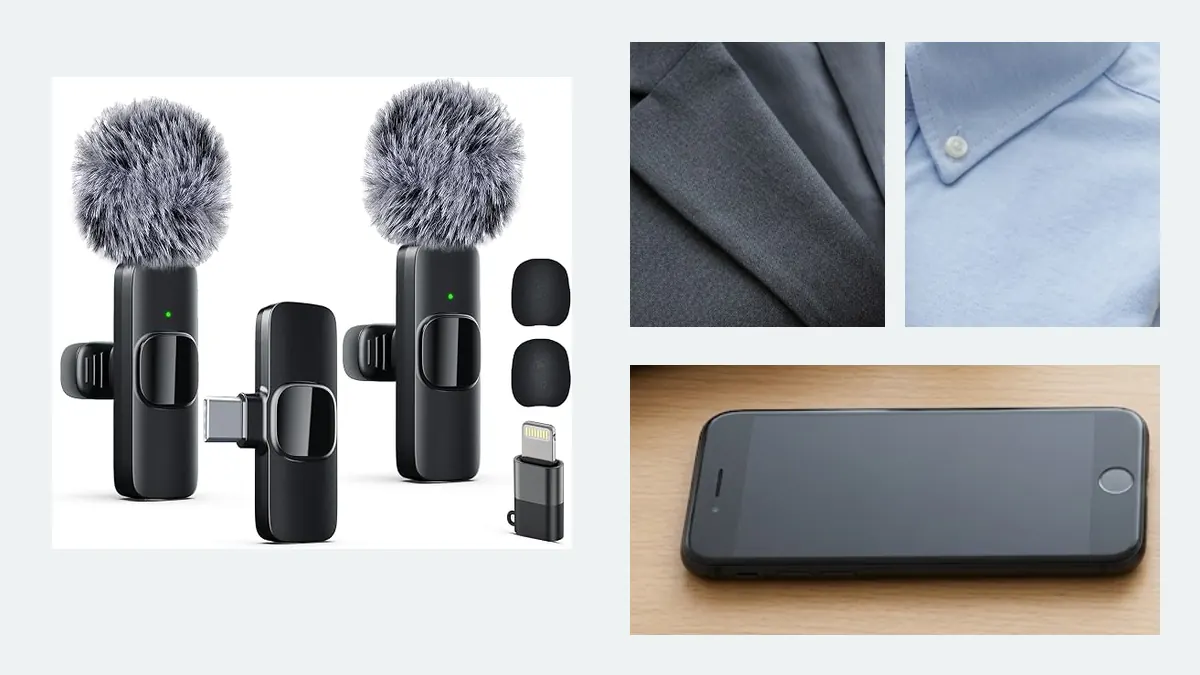
The K9 fits a straightforward budget scenario: two speakers, one phone at a time, a USB-C receiver for newer devices, and a Lightning adapter path for older iPhones. The product image shows two tall clip-on transmitters, one compact receiver, the adapter, and windscreens. That is enough to support a connector-led setup method and a two-person test. It is not enough to claim isolated tracks, dependable performance in every app, or a production-grade backup path.
The listing also contains a conflict worth noticing. Product bullets describe a 2.4 GHz transmission link, while other metadata uses Bluetooth language. A plug-in receiver system usually does not require normal Bluetooth pairing on the phone, and this guide does not treat the K9 as a Bluetooth microphone. Check the current listing or manual before publication and verify the actual pairing procedure on the received kit.
Choose this type of kit when the recording can be repeated, the team accepts a pre-take test, and separate editing is not a hard requirement. Skip it for work that needs headphone monitoring, onboard backup, clearly isolated tracks, camera timecode, or documented app support. Those are not small upgrades to the same decision. They are a different reliability class.
This guide has not measured range, latency, battery duration, noise processing, app compatibility, or recorded-channel separation for the K9. The recommendation is based on connector generations, product architecture, placement guidance, and a repeatable verification method.
09 / Troubleshooting
Work from the phone backward instead of changing several settings at once. The order matters because it separates a phone-input failure from a wireless pairing failure. Keep the test short and replay the saved file after each change.
Remove the case, reconnect the correct receiver or adapter, close and reopen the recording app, and make a new file. If the result still sounds distant and roomy, the phone may be using its internal microphone.
Charge it, confirm its indicator and mute state, and pair it to the same receiver. Swap the two transmitters between speakers to see whether the failure follows the device or the placement.
Match chest placement, record normal speaking and laughter, and use documented gain controls when available. A single mixed track leaves less room to repair the balance later.
Clear loose fabric, hair, jewelry, and coat edges. Outdoors, fit the windscreen correctly and change the speaker's orientation to the wind before relying on electronic noise reduction.
A different iPhone generation can require another receiver path. Even with the same port, case clearance and app recognition may change. Repeat the full chain test rather than assuming the microphones are defective.
Look for explicit split-channel, isolated-track, or onboard-recording support. If the current kit sends one mixed phone input, changing editing software after the fact will not recreate clean independent recordings.
If the recording still fails after a known-good phone, correct receiver, open app, charged transmitters, and verified pairing, stop adding adapters. Return to the product instructions or support path. A pile of undocumented converter cables creates more uncertainty and more strain on the phone port.
Research note
Last reviewed July 10, 2026. Apple's support pages establish the USB-C and Lightning generations and the boundary around compatible USB-C accessories. RODE's lavalier guide supports the placement and clothing-rub method. Five Amazon product pages establish the visible receiver architectures and included pieces. Marketplace reviews and community discussions were used only to identify recurring confusion; no review text, rating, or review count is reproduced. No hands-on recording or app test is claimed.
FAQ
iPhone 15 and later use USB-C. The receiver still needs to support digital audio for the phone, seat fully through the case opening, and be recognized by the recording app.
Only through a documented compatible adapter path. A small adapter that changes the plug shape does not automatically carry supported microphone audio. Test the exact receiver, adapter, phone, and app together.
Many do not. The transmitters pair with the plug-in receiver over their own wireless link, and the receiver connects physically to the phone. Follow the current product instructions when listing metadata is inconsistent.
Not necessarily. A receiver can mix both microphones into one phone input. Separate editing requires explicit split-channel, isolated-track, app, or onboard-recording support.
Record Speaker A and Speaker B one at a time, then replay the saved file. Cover or mute one transmitter during the test. Distant room sound that does not change may indicate the phone microphone is still active.
About 20 to 30 centimeters from the mouth is a practical starting point. Keep the capsule clear of rubbing fabric, hair, jewelry, and loose collar edges, then adjust after a natural speaking test.
It may reduce some background sound, but it cannot replace good placement and a secure windscreen. Fix fabric contact and wind direction first, then compare the product's noise modes with a short recording.
The short version
A dual wireless lavalier kit is ready for an interview only when the receiver path matches the iPhone, both transmitters reach that receiver, the app captures the external input, and the saved file contains both speakers at usable levels. Product labels narrow the choice. A ten-second two-voice recording proves the chain.