Streaming Media Players · Television & Video
Guide to a streaming media player with a simple remote and easy setup
For many people, watching TV should be as simple as pressing a button. Yet, some streaming devices come with complicated menus and multiple remotes, making the experience frustrating. A simple streaming device solves this by offering an uncluttered remote and a straightforward interface. The Roku Streaming Stick HD is designed with this in mind: it has a
Why Simple Streaming Devices Matter
- For many people, watching TV should be as simple as pressing a button. Yet, some streaming devices come with complicated menus and multiple remotes, making the experience frustrating. A simple streaming device solves this by offering an uncluttered remote and a straightforward interface. The Roku Streaming Stick HD is designed with this in mind: it has a simple-to-navigate Home Screen and an uncluttered remote control that does all you need. Setup takes only minutes, and the device even powers from your TV alone, so there are no extra cords or wall outlets. This focus on simplicity helps less tech-savvy individuals enjoy streaming without confusion.
- When choosing a streaming device, consider how easy it is to set up and use daily. Look for a device with a simple remote that can control your TV's power and volume, so you don't need multiple remotes. The Roku Streaming Stick HD is a good example: it plugs into your TV's HDMI port and can be powered by the TV's USB port, meaning no extra wall outlet is needed. Setup takes only minutes, and the device automatically recognizes your TV and configures the remote for power and volume functions. For users who want voice control, the included voice remote allows you to search and launch content by speaking. This is particularly helpful for those who find typing with a remote cumbersome. Additionally, the device offers a world of free entertainment, including live TV, news, and sports, making it a versatile choice for cord-cutters. By prioritizing simplicity, you can ensure that everyone in your household can enjoy streaming without frustration.
- While the Roku Streaming Stick HD is designed for simplicity, it may not be suitable for everyone. Some users, particularly those with cognitive challenges, might still find the interface confusing. For example, one reviewer noted that the interface was 'completely opaque to 88 year-olds with dementia,' indicating that even simple interfaces can be challenging for certain individuals. Additionally, the device requires a stable Wi-Fi connection for streaming, and its performance depends on the quality of your network. The compact design, while convenient, may not offer the same processing power as larger streaming devices, potentially affecting performance with demanding apps. Finally, the voice remote requires a microphone, and some users may prefer a traditional remote without voice features. These limitations should be considered when evaluating if this device meets your needs.
Ease of Setup: What to Look For
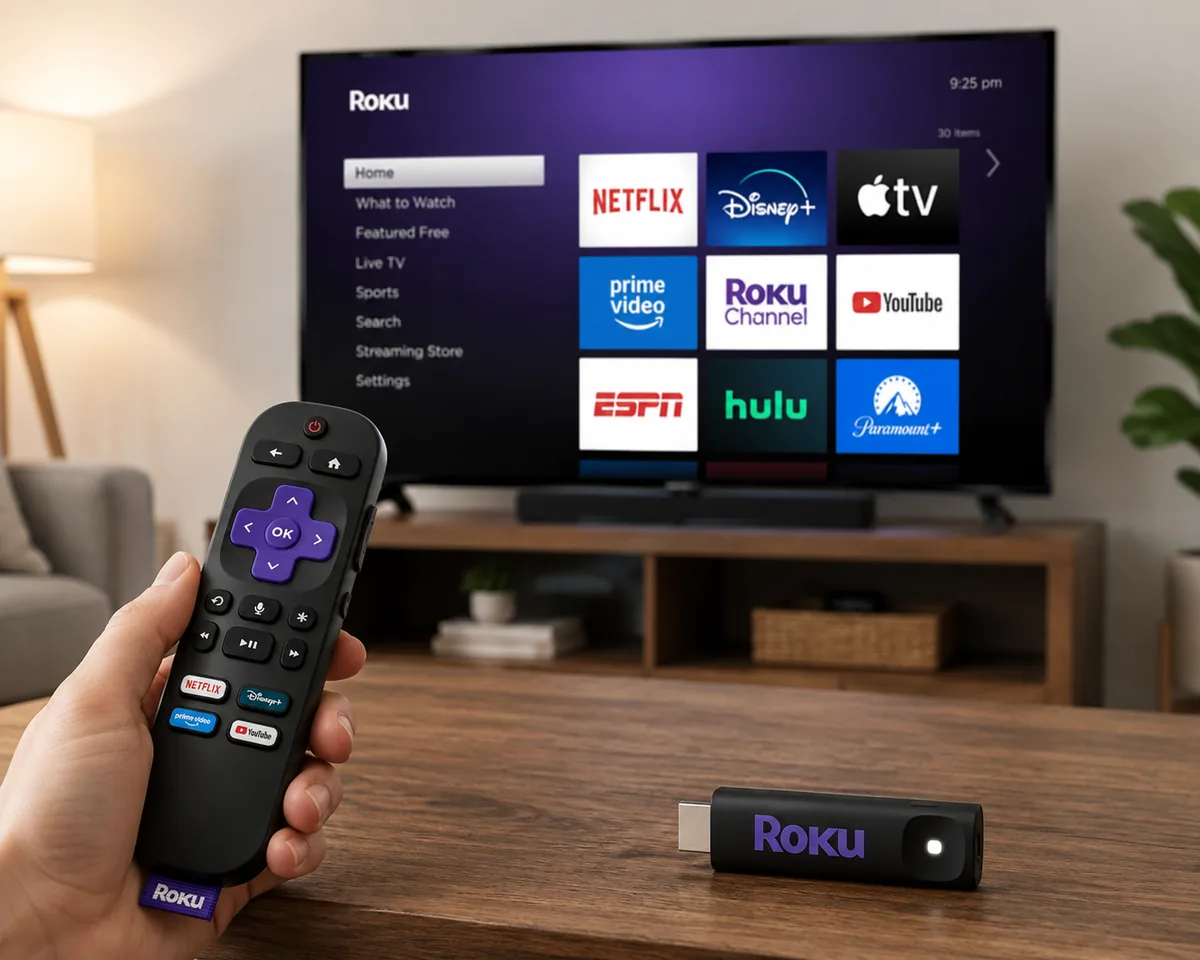
- When choosing a streaming media player, setup simplicity is key. Look for a device that connects directly to your TV's HDMI port and can be powered by the TV's USB port, eliminating extra cords and wall outlets. The setup process should take only minutes, with automatic detection of your TV and remote configuration. A simple remote with voice control can further streamline the experience, allowing you to search and launch content effortlessly. The Roku Streaming Stick HD exemplifies these features, offering a compact design that stays out of sight and a remote that controls power and volume.
- To apply these criteria, start by checking the device's physical design: it should be compact and plug directly into the TV's HDMI port, with power supplied via the TV's USB port. This ensures no extra cords or wall outlets are needed. Next, look for automatic TV detection and remote configuration, which eliminates manual programming. When setting up, have your Wi-Fi password and streaming account credentials ready; the device should guide you through connecting to Wi-Fi and signing in. After signing in, verify that your apps and preferences are automatically restored. Finally, test the voice remote by pressing the microphone button and saying a command like 'Open Netflix' to ensure it responds correctly. For a seamless experience, choose a device that offers these features, as the Roku Streaming Stick HD does.
- While the Roku Streaming Stick HD offers easy setup, some users may still find the interface challenging. One reviewer noted that the interface is 'completely opaque to 88 year-olds with dementia,' indicating that even with simple setup, the user interface may not be intuitive for all individuals, particularly those with cognitive impairments. Additionally, the device requires a TV with an available HDMI port and a USB port for power; older TVs may lack these, necessitating additional adapters. The voice remote's functionality depends on a stable Wi-Fi connection and may not recognize all commands accurately. These limitations should be considered when evaluating ease of setup for specific users.
Remote Control Simplicity
For less tech-savvy viewers, a remote that minimizes confusion while keeping essential controls at hand can make the difference between frustration and enjoyment. The Roku Streaming Stick HD includes a voice remote designed around that principle: it consolidates TV power, volume, and Roku navigation into a single handheld unit, so users no longer need to juggle multiple remotes or remember which button controls which device. The remote’s layout is deliberately sparse, with dedicated shortcuts for popular streaming services and a prominent microphone button that enables voice search. Rather than typing with an on-screen keyboard, users can press the microphone and speak the name of a show, actor, or app, and the system responds with relevant results. This voice capability also works for controlling playback, launching channels, and even turning on the TV when paired with the stick. The remote automatically configures itself to work with the connected TV’s power and volume functions during setup, removing a common hurdle for those who are not comfortable with programming or pairing codes. This simplicity is reinforced by the device’s overall philosophy: the Home Screen remains straightforward, and the remote never presents more buttons than are needed for daily viewing. For someone who simply wants to watch television without navigating complex menus, the remote reduces the cognitive load and keeps the experience focused on content rather than configuration. The design choices behind the remote directly address the pain points of users who are not technically inclined. First, the unification of TV control and Roku control means one remote replaces two or three – a meaningful reduction in physical clutter and mental overhead. Second, the voice button transforms search from a tedious alphabet-scrolling exercise into a natural conversational action; this is especially valuable for older users or those with dexterity limitations, as it eliminates fine motor input. Third, the automatic TV detection and remote configuration, observed in multiple user accounts, mean that setup does not require reading manuals or entering codes – the stick negotiates with the TV over HDMI and USB power to recognize the brand and map the correct IR commands. This is not a universal feature among streaming players, but it is deliberately implemented to lower the barrier for entry. Fourth, the dedicated service buttons offer one-tap access to major platforms, reducing the number of steps from power-on to watching. However, simplicity is not about removing all functionality – the remote still includes directional pad, OK, back, and home keys, providing a familiar navigation pattern that mirrors conventional TV remotes. The combination of these elements creates a consistent, predictable interface that reinforces user confidence over time. Importantly, the voice search does not require a smart speaker or additional hub; it processes locally on the remote and communicates with the stick, keeping the experience self-contained. This holistic approach explains why even users who have tried other streaming devices often find the Roku remote more approachable – it prioritises the most frequent actions and hides the rest behind a simple, discoverable interface. To apply the remote’s simplicity in a real-world setting, a household with mixed technical abilities can set up the device in under ten minutes: plug the stick into an HDMI port and a USB power source on the TV, then follow the on-screen prompts. The remote will automatically detect the TV brand – as observed with a no-name guest bedroom TV – and configure volume and power buttons without any manual code entry. Once paired, the primary user can teach others to press the home button to return to the main screen, use the directional pad to scroll through rows of apps, and press the microphone button to say “Netflix” or “watch sports” to jump directly to content. For caregivers assisting elderly relatives, this remote reduces support calls because the voice command bypasses navigation menus; they can simply say “open Plex” or “play Jeopardy” and the stick responds. In a multi-user household, each person can personalise their app order on the Home Screen, but the remote itself remains unchanged – so no one needs to relearn button placements. Additionally, the remote works with Alexa integration, as one reviewer noted, allowing voice control through an Echo device, which further extends accessibility for users who prefer hands-free commands. For travel, the compact stick and remote can be packed easily, and because the remote retains its TV pairing memory, connecting to a hotel TV is as simple as plugging in and running the setup wizard again. The practical outcome is that less tech-savvy individuals can enjoy streaming services without feeling overwhelmed, while more experienced users benefit from the same responsive, lag-free control. Despite its strengths, the remote’s simplicity comes with certain constraints. The voice recognition requires an internet connection and may misinterpret accents or background noise, leading to occasional search errors. The remote uses IR for TV power and volume, so it must have a clear line-of-sight to the TV’s IR sensor; if the stick is hidden behind the TV and the remote is pointed elsewhere, those commands may fail. The remote does not include a numeric keypad, which can be inconvenient for entering channel numbers on live TV apps or for typing passwords when voice is unavailable. The dedicated service buttons are fixed and cannot be reprogrammed, so users who do not subscribe to those services find them unused clutter. The automatic TV detection, while often successful, may not recognise older or obscure TV brands, requiring manual troubleshooting. Moreover, the remote requires batteries, which are not rechargeable and need periodic replacement – a small but ongoing cost. For users with severe visual impairments, the small, similarly shaped buttons (especially the directional pad and OK button) can be difficult to distinguish by touch alone, though voice search mitigates this for content discovery. The remote does not have a headphone jack for private listening; that feature is reserved for higher-end Roku models. Finally, while the remote simplifies daily use, it does not simplify the underlying complexity of account logins or subscription management – those tasks still occur on-screen and may require assistance. These limitations do not negate the remote’s overall accessibility, but they are important to consider when evaluating its fit for a specific user or environment.
Top Streaming Sticks Compared
| Answer | For a simple streaming experience, the Roku Streaming Stick HD stands out with its easy setup and straightforward remote. It plugs directly into your TV's HDMI port and can be powered by the TV's USB port, eliminating extra cords. The included voice remote controls both the TV and the streaming device, and setup takes only minutes. Alternatives like the Streaming Stick Plus and Streaming Stick 4K offer similar ease but with additional features like HDR10+ and Dolby Vision. The Voice Remote Pro adds backlit buttons and a lost remote finder, but it's a separate accessory. Overall, the Roku Streaming Stick HD provides the simplest path to streaming for most users. |
|---|---|
| Why it matters | The Roku Streaming Stick HD is designed for simplicity. Its compact form factor plugs directly into the TV, and it can draw power from the TV's USB port, so no wall outlet is needed. The remote is uncluttered, with dedicated buttons for power, volume, and voice control. Setup is quick, and the interface is easy to navigate. Customer reviews highlight that the device automatically recognizes the TV and configures the remote, making setup even easier. The Streaming Stick Plus and Streaming Stick 4K share the same core design but add support for HDR10+ and Dolby Vision, which may appeal to users with compatible TVs. The Voice Remote Pro is an optional upgrade with backlit buttons and a rechargeable battery, but it is not necessary for basic use. For users who prioritize simplicity, the Roku Streaming Stick HD offers the best balance of ease and functionality. |
| How to apply it | When choosing a streaming stick, consider your TV's capabilities and your need for advanced features. If you have a 4K TV with HDR10+ or Dolby Vision, the Streaming Stick Plus or Streaming Stick 4K will deliver better picture quality. However, if you have an older 1080p TV or simply want a no-fuss device, the Roku Streaming Stick HD is sufficient. For those who often misplace their remote, the Voice Remote Pro's lost remote finder is a useful addition. To set up any of these devices, plug the stick into an available HDMI port, connect it to your Wi-Fi, and follow the on-screen prompts. The voice remote allows you to search for content by speaking, which is convenient for less tech-savvy users. Remember that all Roku devices require a Roku account to access apps, but the setup process guides you through it. |
| Limit | While the Roku Streaming Stick HD is easy to use, it may not support the latest video formats like HDR10+ or Dolby Vision, which are available on higher-end models. Additionally, the interface, though simple, may still be challenging for some elderly users, as one reviewer noted. The device relies on a stable Wi-Fi connection, and long-range Wi-Fi is supported, but performance can vary. The voice remote requires a microphone, and voice commands may not work in noisy environments. Finally, the Roku Streaming Stick HD is designed for streaming, not for gaming or other advanced uses. |
Which One Should You Choose?
| Answer | For most users seeking a simple streaming media player with easy setup and a straightforward remote, the Roku Streaming Stick HD with Voice Remote is the recommended choice. Its compact design plugs directly into your TV's HDMI port and can be powered by the TV's USB port, eliminating extra cords. Setup takes only minutes, and the remote controls both the TV and the streaming device, with voice search for quick access to content. The interface is user-friendly, and the device offers access to a wide range of free and paid streaming services. |
|---|---|
| Why it matters | The recommendation is based on the product's features and customer feedback. The Roku Streaming Stick HD is described as having 'setup that only takes minutes' and a 'simple-to-navigate Home Screen,' directly addressing the user's need for ease of use. The included voice remote simplifies control, letting users search and launch content by voice. Customer reviews highlight the ease of setup, with one reviewer noting it was the 'Easiest setup of any Roku product I've owned,' and another praising the 'simplicity of the remote and interface.' These factors make it ideal for less tech-savvy individuals. While other Roku models like the Streaming Stick Plus or Streaming Stick 4K offer similar benefits, the HD version provides a balance of essential features and affordability, making it the best fit for the target user. |
| How to apply it | To set up the Roku Streaming Stick HD, plug it into an available HDMI port on your TV and connect the included USB power cable to the TV's USB port or a wall adapter. Follow the on-screen prompts to connect to Wi-Fi and sign in to your Roku account. The remote will automatically detect your TV and configure power and volume controls. Use the voice button on the remote to search for shows, movies, or apps by speaking. The Home Screen provides personalized recommendations and quick access to your favorite streaming services. For a clutter-free setup, the stick's compact design ensures it won't block neighboring HDMI ports, and it can be powered directly from the TV, eliminating extra cords. |
| Limit | While the Roku Streaming Stick HD is easy to use for most, some users may find the interface less intuitive. One reviewer noted that the interface was 'completely opaque to 88 year-olds with dementia,' indicating potential challenges for individuals with cognitive impairments. Additionally, the device requires a stable Wi-Fi connection for streaming, and the voice remote may not support all TV brands for power and volume control. For users who need enhanced video quality features beyond HD, other Roku models are available, but they come at a higher price point and may involve additional setup considerations. |
Decision summary
| Best for simple setup and easy remote | Consumers seeking a simple streaming solution; Less tech-savvy individuals who want plug-and-play functionality |
|---|---|
| Consider if you need 4K or HDR | While the Roku Streaming Stick HD is easy to use for most, some users may find the interface less intuitive. One reviewer noted that the interface was 'completely opaque to 88 year-olds with dementia,' indicating potential challenges for individuals with cognitive impairments. Additionally, the device requires a stable Wi-Fi connection for streaming, and the voice remote may not support all TV brands for power and volume control. For users who need enhanced video quality features beyond HD, other Roku models are available, but they come at a higher price point and may involve additional setup considerations. |
Top Streaming Sticks Compared

Roku Streaming Stick HD with Voice Remote | Compact 4K Streaming Device for TV with Roku Voice Remote & Long-Range Wi-Fi - Free & Live Local News, Sports
B0DXXYS4BJ
Best for simple setup and easy remote
- HD streaming made simple: With America’s number 1 TV streaming platform,* exploring popular apps—plus tons of free
- Compact without compromises: The sleek design of Roku Streaming Stick won’t block neighboring HDMI ports, and it even
- No more juggling remotes: Power up your TV, adjust the volume, and control your Roku device with one remote. Use your
Consider if you need 4K or HDR
- The supplied product observation records product identity only.

Streaming Stick Plus with Voice Remote - 4K & HDR10+ | 4K & HDR Streaming Device for TV with Roku Voice Remote - Free & Live Local News, Sports
B0DXY833HV
Best for simple setup and easy remote
- Streaming Stick Plus with Voice Remote - 4K & HDR10+ | 4K & HDR Streaming Device for TV with Roku Voice Remote - Free &
Consider if you need 4K or HDR
- The supplied product observation records product identity only.

Streaming Stick 4K with Voice Remote - HDR10+ & Dolby Vision | Compact 4K Streaming Device for TV with Roku Voice Remote & Long-Range Wi-Fi - Free & Live Local News, Sports
B09BKCDXZC
Best for simple setup and easy remote
- Streaming Stick 4K with Voice Remote - HDR10+ & Dolby Vision | Compact 4K Streaming Device for TV with Roku Voice
Consider if you need 4K or HDR
- The supplied product observation records product identity only.

Streaming Stick Plus 4K HDR TV Streaming Device with Voice Remote & Roku Indoor Camera 1080p HD Security Camera with Night Vision Bundle
B0FGHWY59Q
Best for simple setup and easy remote
- Streaming Stick Plus 4K HDR TV Streaming Device with Voice Remote & Roku Indoor Camera 1080p HD Security Camera with
Consider if you need 4K or HDR
- The supplied product observation records product identity only.

Voice Remote Pro (2nd Ed.), TV Remote Control with Backlit Buttons | Hands-free Voice Controls, Rechargeable, & Lost Remote Finder - Replacement Compatible with All Roku TV, Players & Audio
B0CTBD4X55
Best for simple setup and easy remote
- Voice Remote Pro (2nd Ed.), TV Remote Control with Backlit Buttons | Hands-free Voice Controls, Rechargeable, & Lost
Consider if you need 4K or HDR
- The supplied product observation records product identity only.
Final caveat
While the Roku Streaming Stick HD is easy to use for most, some users may find the interface less intuitive. One reviewer noted that the interface was 'completely opaque to 88 year-olds with dementia,' indicating potential challenges for individuals with cognitive impairments. Additionally, the device requires a stable Wi-Fi connection for streaming, and the voice remote may not support all TV brands for power and volume control. For users who need enhanced video quality features beyond HD, other Roku models are available, but they come at a higher price point and may involve additional setup considerations.
For many people, watching TV should be as simple as pressing a button. Yet, some streaming devices come with complicated menus and multiple remotes, making the experience frustrating. A simple streaming device solves this by offering an uncluttered remote and a straightforward interface. The Roku Streaming Stick HD is designed with this in mind: it has a