Smart-home subscriptions need a camera-count check first
Blink subscription plan for multiple cameras
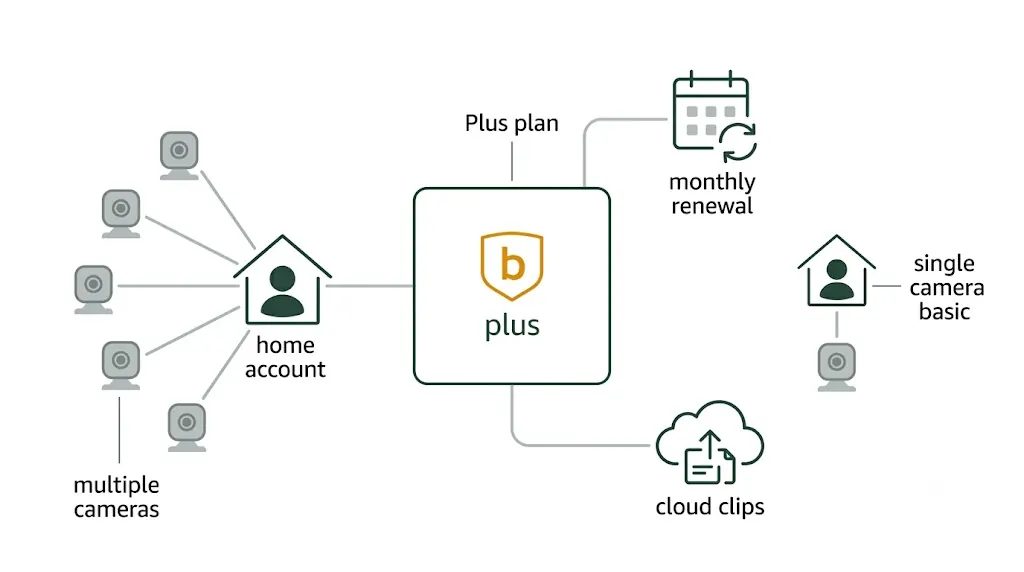
The Blink Plus monthly plan makes the most sense when the account has several eligible Blink cameras and the buyer wants plan features across the account without committing to annual billing. A one-camera setup should start with Basic or local storage instead, because Plus is mainly about account-wide coverage and Plus-only benefits.
Before comparing plans
Start with camera count, not the monthly price
Blink plans are easy to misunderstand because the buyer often sees a subscription before mapping the actual home setup. The first decision is not whether a plan sounds cheap, expensive, basic, or premium. It is whether the account has one camera or several cameras that need the same paid features. Blink's own support material separates Basic as a one-camera plan and Plus as the broader account plan. That distinction matters more than the billing interval because it changes how many devices the plan is meant to cover.
For a single indoor camera watching a pet room, a garage shelf, or a temporary apartment door, Basic can be the cleaner path. For a doorbell, driveway camera, backyard camera, and indoor camera under one account, Plus becomes easier to justify because the plan is no longer solving one camera's storage problem. It is simplifying a multi-camera account. This page uses the Blink Plus Plan with monthly auto-renewal, ASIN B08JHCVHTY, as the anchor product because monthly Plus is the flexible version of that multi-camera decision.
Use Plus only if most of these are true
More than one eligible Blink camera needs paid plan features.
The cameras are tied to the same Blink account and Amazon account path.
Cloud clip storage is more useful than local-only storage for this setup.
The buyer is comfortable with auto-renewal and knows how cancellation works.
AI features, if considered, are available in the buyer's region and worth the extra plan type.
Basic and Plus solve different account problems
Basic is best understood as a one-camera cloud plan. It can be useful when a buyer has a single camera in a focused location and wants cloud clips without building a larger Blink system. The limitation is also the point: Basic keeps the plan tied to one camera. If the household keeps adding cameras, buying or managing separate Basic paths can become the wrong kind of simple.
Plus is the account-level answer. Blink describes Plus as covering an unlimited number of devices per account, subject to eligible-device and feature boundaries. That does not mean every feature works on every camera. It means the plan type is designed around the account rather than a single camera. The buyer still has to check which camera models support the features they care about, such as Extended Live View, Photo Capture, Person Detection, Moments, or optional local storage backup.
This is where product pages often become too thin. Saying "Plus covers more cameras" is not enough. A good decision depends on what happens when the setup changes. If the buyer adds a driveway camera three months later, Plus monthly can absorb that change better than a one-camera plan. If the buyer removes cameras seasonally, moves apartments, or is still testing the system, monthly billing is easier to exit than a yearly plan. If the camera system is stable and always-on, annual billing may become the more practical version of the same Plus choice.
What changes when the setup grows
Decision point
Basic plan path
Plus plan path
Camera count
One eligible camera.
Multiple eligible cameras under the account.
Buying comfort
Good for a narrow test or one fixed location.
Better when the system is already a small camera network.
Billing interval
Monthly for flexibility, yearly when the one-camera need is stable.
Monthly for testing multi-camera value, yearly when the setup is settled.
Feature caveats
Feature support still depends on camera model and region.
Plus-only benefits still have eligibility and regional limits.
The table should be read as a fit check, not a universal ranking. The strongest Plus case is a household that already treats Blink as a small camera system. The weakest Plus case is a single-camera trial where local storage would be enough and the buyer mainly wants to avoid another subscription.
For multi-camera Blink accounts, the plan choice is mainly about whether one account needs plan features across several cameras, not whether a subscription card looks more complete.
Monthly auto-renewal is flexibility, but it still needs a cancellation plan
A monthly auto-renewing plan is useful when the buyer is still learning the camera setup. Renters, seasonal users, and people adding cameras one at a time often benefit from being able to reassess after a month or two. The risk is that monthly plans become background costs. If the household no longer needs cloud clips, if local storage is handling the job, or if some cameras have been removed, the plan should be revisited instead of allowed to renew by habit.
The safer way to use monthly Plus is to set a review point before buying. Decide what would prove the plan is useful: clips that are actually checked, cameras that all need the same plan features, fewer missed events, or a support/warranty reason that applies to eligible devices. If none of those happen after the trial period or first billing cycle, Basic, local storage, or no paid plan may be cleaner.
Annual billing should follow a stable setup
Yearly Plus is not a better plan for every buyer; it is a different commitment pattern. It fits when the camera count, locations, account owner, and feature needs are unlikely to change. A homeowner with a stable doorbell, driveway camera, and backyard camera may see yearly Plus as a lower-friction version of the same choice. A renter testing one camera in a temporary apartment should be more cautious.
The same logic applies to Basic yearly. It works when one camera will definitely stay subscribed. It is less useful when the buyer is experimenting or expects to expand. In subscription pages, the mistake is often comparing plans as if the product were a one-time purchase. The better question is how likely the account is to look the same three, six, or twelve months from now.
Cloud clips, local storage, and AI features change the answer
Cloud clip storage is the most obvious reason to consider a Blink plan, but it is not the only storage path. Blink support material points to Sync Module 2 with USB storage or Sync Module XR with microSD for local storage support in compatible setups. That matters because some users do not need cloud clips enough to pay every month. A household that only checks clips occasionally may prefer local storage if the camera and module setup supports it. A household that wants easier remote clip review may lean toward a paid plan.
AI plan features require a separate check. Blink's plan material describes Basic AI and Plus AI availability by country and notes regional exclusions for some AI-related features. Treat those features as conditional, not universal. For a buyer in a restricted location or using unsupported camera models, a non-AI plan may be the only practical comparison. For a buyer who does qualify and wants event descriptions or other AI plan features, Plus AI monthly becomes a relevant product option, but it still has to be judged against camera count, renewal comfort, and privacy expectations.
Privacy and account control should stay part of the decision. A paid cloud plan can be convenient, but it also makes the account, renewal method, app access, and cloud-clip handling more important. The buyer should know which Amazon account is linked, who manages the subscription, who can access clips, and whether the system still works acceptably if the plan is cancelled. That is a better ownership test than simply asking whether Plus has more features.
Plan choices for this setup
Five Blink plan ASINs to compare for this decision
These are plan-only ASINs collected from the same Amazon plan search. Hardware bundles with included plans were excluded so the comparison stays focused on subscription choices.
ASIN B08JHCVHTY
Blink Plus Plan with monthly auto-renewal
Fits when: Best fit when the account already has, or will soon have, several eligible Blink cameras and the buyer wants month-to-month flexibility.
Skip when: Skip if the setup is one camera, if local storage is enough, or if the buyer does not want an auto-renewing subscription.
Product links are sponsored links. Use Amazon for current plan availability, billing terms, and final checkout details.
Evidence boundaries and mistakes to avoid
This page does not claim hands-on testing of Blink cameras or plan performance. It uses Blink support pages, Blink plan information, Amazon plan ASINs, and consumer privacy/account-control context to explain the decision path. Volatile details such as price, availability, discounts, and plan terms can change, so the final purchase step should happen on Amazon or Blink with the buyer's region and account state visible.
The most common mistake is buying a subscription before confirming the camera and account setup. Another mistake is treating AI plan features as universal when availability and feature support can vary by country, jurisdiction, app language, and device. A third mistake is using annual billing as a shortcut before the system is stable. For a multi-camera account, Plus monthly is a reasonable starting point. For one camera, Basic or local storage should be checked first.
No, but the account-wide coverage is the main reason to consider it. A one-camera setup should compare Basic and local storage first.
Is monthly Plus better than yearly Plus?
Monthly is better for testing or changing setups. Yearly makes more sense after the camera count and locations are stable.
Should AI features decide the plan?
Only after checking region, device, app, and privacy fit. AI plan features are not a universal substitute for the Basic versus Plus camera-count decision.
How to choose USB-C wired earbuds for iPhone 15 and later: compatibility, Apple EarPods USB-C, inline controls, no-battery use, cleaning, fit limits, and alternatives.